
Teachers today juggle LMS dashboards, lesson planning, grading queues, and students who expect interactive learning. Study materials get scattered across Google Drive, PDFs, and lecture slides. Students feel overwhelmed. Teachers feel stuck repeating explanations.
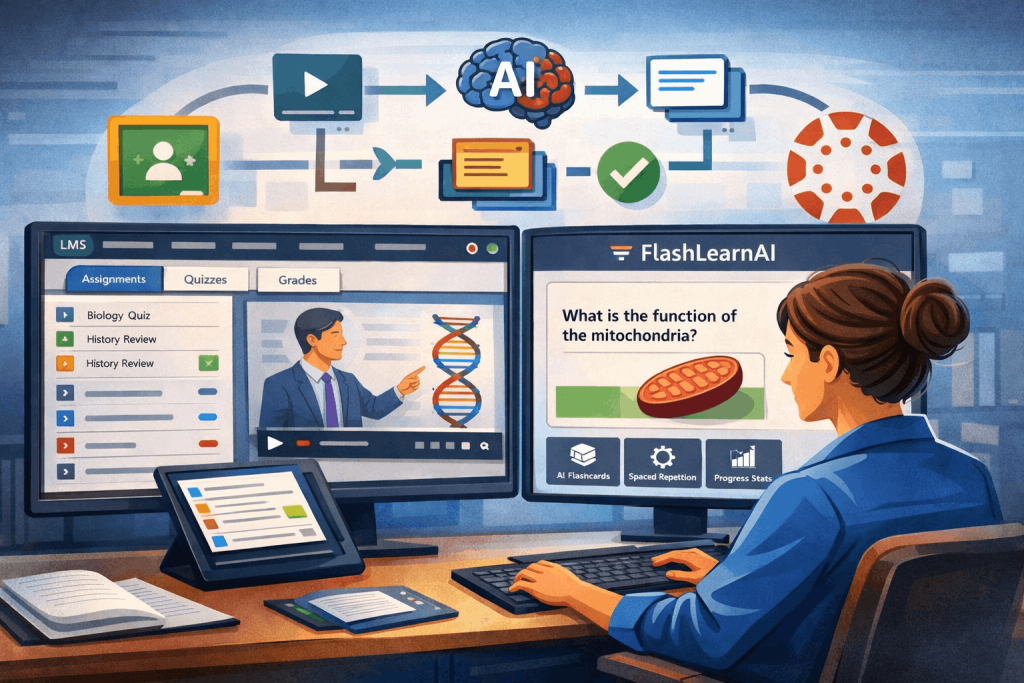
That is where flashcard generators that integrate with online classrooms change everything. Instead of forcing learners to leave their learning environment, integrated tools bring active recall and spaced repetition directly into the workflow students already use.
This guide from FlashLearnAI walks you through the best tools, the pedagogy behind LMS integration, and how to choose the right AI flashcard solution for modern classrooms.
Many educators today are specifically searching for flashcard generators that integrate with online classrooms because disconnected study tools waste time and reduce engagement. Instead of sending students to separate apps, classroom-integrated flashcard generators allow teachers to assign digital flashcards directly through LMS platforms like Canvas and Google Classroom. This keeps learning centralized, structured, and easier to track.
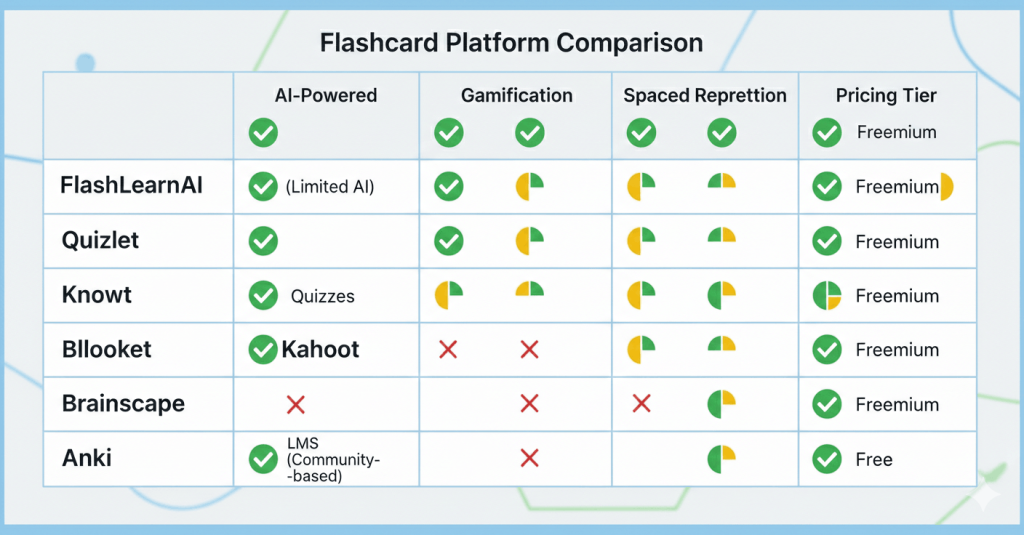
Quick Comparison Table (TL;DR for Busy Educators)
| Tool | LMS Integration | AI Flashcard Creation | Best For | Key Strength |
|---|---|---|---|---|
| FlashLearnAI | LTI + API | Yes | Teachers & institutions | Automated study workflows |
| Quizlet | Google Classroom | Limited AI | General classrooms | Familiar interface |
| Kahoot! | LMS export & sharing | Partial | Engagement activities | Interactive quizzes |
| Blooket | Google Classroom sharing | No | Gamified classrooms | Motivation & fun |
| Knowt | Google Classroom | Yes | Student-led studying | Simple AI tools |
| Brainscape | API/LMS workflows | Limited | Mastery learning | Structured spaced repetition |
| Anki | Third-party plugins | No native AI | Advanced learners | Deep customization |
The Real Problem Teachers Face Today

Many educators already use LMS platforms like Google Classroom, Canvas, or Moodle. But here is the issue:
- Notes sit in one place
- Practice quizzes in another
- Flashcards in external apps
- Students rarely revisit materials
The result? Passive review instead of active learning.
Flashcard generators that integrate with online classrooms solve this by embedding retrieval practice inside the learning environment. Students engage with content where they already learn.
If you teach healthcare or exam-heavy courses, you might also explore our guide on AI flashcard apps used by medical students preparing for high-stakes exams.
Why LMS Integration Matters (The Pedagogy Behind It)
1. Learning Happens in Context
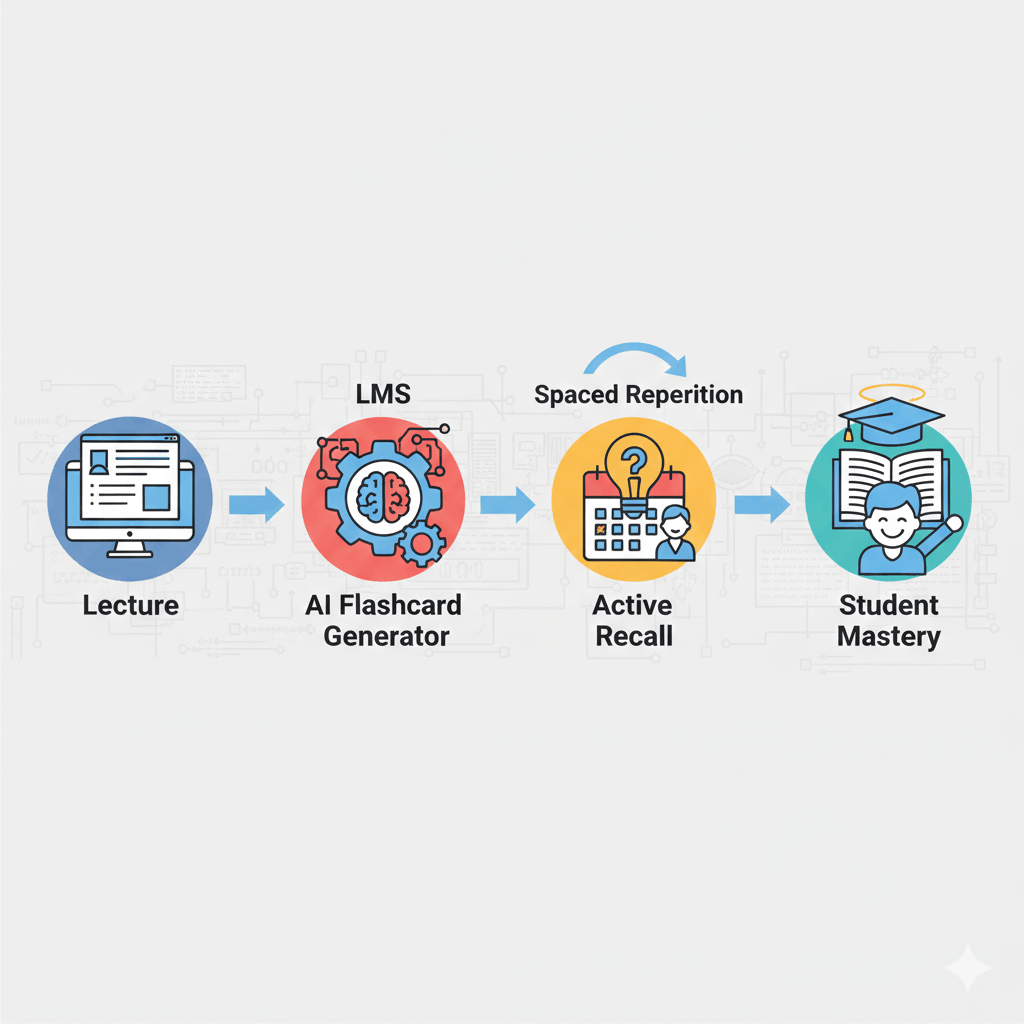
When teachers use flashcard generators that integrate with online classrooms, students review material inside their normal learning environment instead of switching platforms. Integrated flashcard apps for LMS classrooms support consistent study habits, automatic progress tracking, and seamless assignment workflows. When study tools live inside the LMS:
- Students do not lose focus switching apps
- Assignments link directly to practice materials
- Teachers track progress through familiar dashboards
This keeps learning continuous, not fragmented.
If you want deeper research insights, see our evidence-based review explaining how AI study tools improve retention and student performance.
2. Supports Active Recall and Spaced Repetition
Cognitive science shows that structured review dramatically improves retention. A clinical study involving medical students found that spaced repetition flashcards significantly improved academic performance compared with traditional study methods.
If flashcards are embedded in the LMS:
- Teachers assign reviews automatically
- Students get adaptive reminders
- Learning becomes habit-based, not last-minute
3. Real Data for Instructional Decisions
Integrated flashcard apps provide:
- Completion analytics
- Weak topic identification
- Adaptive learning insights
Instead of guessing where students struggle, educators see real patterns.
Key EdTech Concepts Every Teacher Should Understand
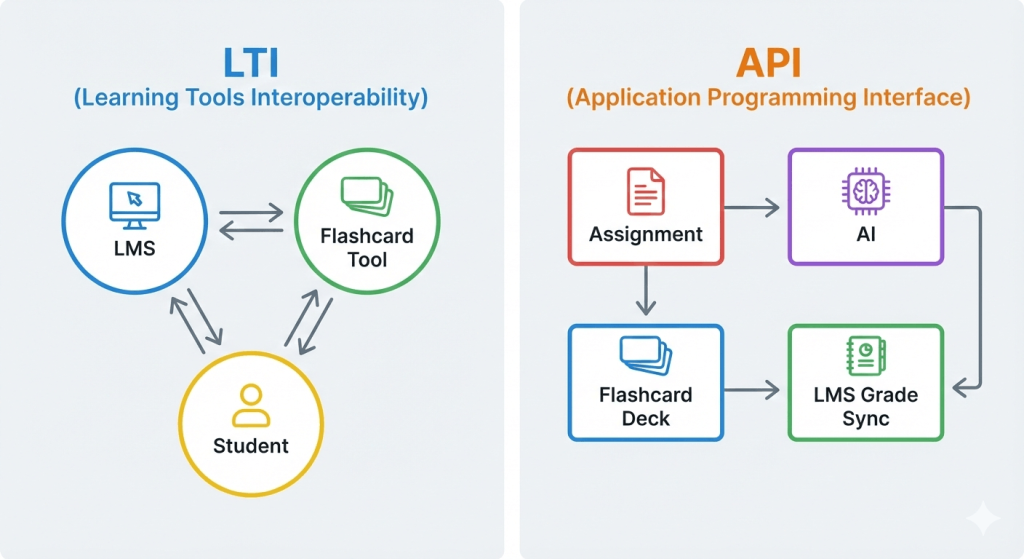
LTI Standards (Learning Tools Interoperability)
LTI is a universal connection protocol. It allows a flashcard tool to:
- Sync student rosters
- Pass grades back to LMS
- Enable single sign-on access
API Access
APIs allow platforms to exchange data automatically. In flashcard tools, APIs help:
- Convert assignments into study decks
- Import lecture transcripts
- Sync performance analytics
Digital Flashcards for LMS
These are flashcards that exist within the LMS ecosystem rather than standalone apps. They often include:
- AI content generation
- Automated spaced repetition
- Teacher analytics dashboards
The Best Flashcard Generators That Integrate with Online Classrooms
1. FlashLearnAI — Best AI-Powered LMS Integration Solution
FlashLearnAI is designed for modern educators who want automation without sacrificing pedagogy.
Key Features
- LTI and API integration for Canvas and Google Classroom
- Video → transcript → flashcard workflows
- AI-generated visual mnemonics
- Evidence-based spaced repetition engine
Why Teachers Love It
- Converts lecture slides into digital flashcards instantly
- Integrates active recall directly into LMS modules
- Supports structured learning pathways
Best for educators who want automation plus cognitive science-backed learning.
2. Quizlet — Popular Classroom Flashcard Platform
Quizlet remains a familiar choice for many teachers.
Strengths
- Google Classroom compatibility
- Large public study library
- Easy onboarding for students
Limitations
- Limited deep LMS analytics
- AI capabilities still evolving
- Not designed for full workflow automation
Best for quick deployment in general education settings.
3. Kahoot! — Engagement-Focused Study Tool
Kahoot! is known for live quizzes but also works as a study reinforcement tool.
Key Benefits
- LMS sharing and export features
- Gamified review sessions
- Interactive classroom competitions
Best Use Case
- Revision days
- Reinforcement sessions
- Formative assessment
4. Blooket — Gamified Study Reinforcement
Blooket focuses heavily on engagement through game mechanics.
Pros
- Google Classroom sharing
- High student motivation
- Quick setup
Cons
- Limited structured spaced repetition
- Not built for deep LMS analytics
Ideal for boosting participation rather than long-term mastery.
5. Knowt — Lightweight AI Flashcard Creator
Knowt offers AI-powered flashcard generation and Google Classroom compatibility.
Highlights
- Converts notes into flashcards
- Student-friendly interface
- Simple collaboration tools
Best for classrooms experimenting with AI study tools.
6. Brainscape — Structured Mastery Learning
Brainscape focuses on confidence-based repetition systems.
Strengths
- Structured spaced repetition
- API-based integration workflows
- Progress-based learning models
Best for professional or certification programs.
7. Anki — Advanced Customization with Plugins
Anki is powerful but requires technical setup for LMS workflows.
Advantages
- Highly customizable spaced repetition
- Strong learning science foundation
- Massive user community
Challenges
- No native LMS integration
- Steep learning curve for teachers
Best for advanced learners or specialized programs.
FAQS(Flashcard Generators That Integrate with Online Classrooms)
Does FlashLearnAI integrate with Canvas?
Yes. FlashLearnAI supports LTI standards and API workflows, allowing instructors to sync assignments, grades, and flashcard activities directly within Canvas.
Are digital flashcards effective for student learning?
Yes. Research shows that spaced repetition flashcards improve long-term retention and academic performance compared with traditional study methods
What is the best AI flashcard maker for teachers?
Tools like FlashLearnAI and Knowt offer AI automation, but FlashLearnAI is built specifically for classroom workflows and LMS integration.
Can Google Classroom automatically create flashcards?
With integrated tools like FlashLearnAI, teachers can convert assignments or lecture notes into flashcards automatically and assign them directly within Google Classroom.
How to Choose the Right Flashcard Generator for Your LMS
Ask yourself:
- Does it support LTI or API integration?
- Can it automate flashcard creation?
- Does it use evidence-based learning science?
- Will it reduce teacher workload?
If your goal is engagement only, gamified tools may work.
If your goal is long-term mastery, choose an AI-powered system with adaptive repetition.
Language teachers may also find our practical guide on creating effective language learning flashcards helpful when designing LMS-based study workflows.
Final Thoughts: The Future of Classroom Study Tools
Education is shifting from static content to adaptive learning systems. Teachers no longer need to manually build study materials from scratch. Integrated AI flashcard tools transform:
- Lecture notes into active practice
- LMS assignments into adaptive reviews
- Student data into actionable insights
FlashLearnAI represents the next generation of flashcard generators that integrate with online classrooms, combining automation with cognitive science.
Ready to Transform Your Classroom Study Workflow?
If you are an educator who wants:
- Automated flashcard creation
- Deep LMS integration
- Evidence-based learning tools
- AI-powered study systems
Start using FlashLearnAI today and turn your LMS into an intelligent learning engine.
Because modern students do not just need more content.
They need smarter ways to learn it.